
All in Bun 半年了,体验非常不错,什么叫 All in Bun 呢?就是我已经半年没有运行过 node,npm,pnpm,yarn,nvm 这些命令了,完全就是一个 bun 命令解决所有的运行,安装,更新,发包等等问题。
分享几个我最喜欢的 Bun 功能:
内置 Sql 和 Redis 功能
如果我们要在 Bun 中使用数据库和缓存功能,不用安装什么node-mysql2,不用安装什么better-sqlite3,不用安装什么postgres,不用安装什么redis或ioredis,直接就是import { sql, redis } from "bun" 拿来就用,简单又方便。
内置打包功能
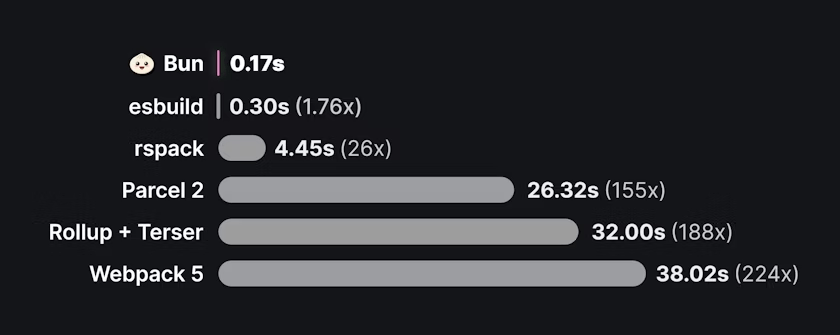
直接对标 rollup,webpack,esbuild,rspack 等打包工具,开箱即用。
我很喜欢这个功能,因为它非常方便就能把一个项目打包为一个单文件。
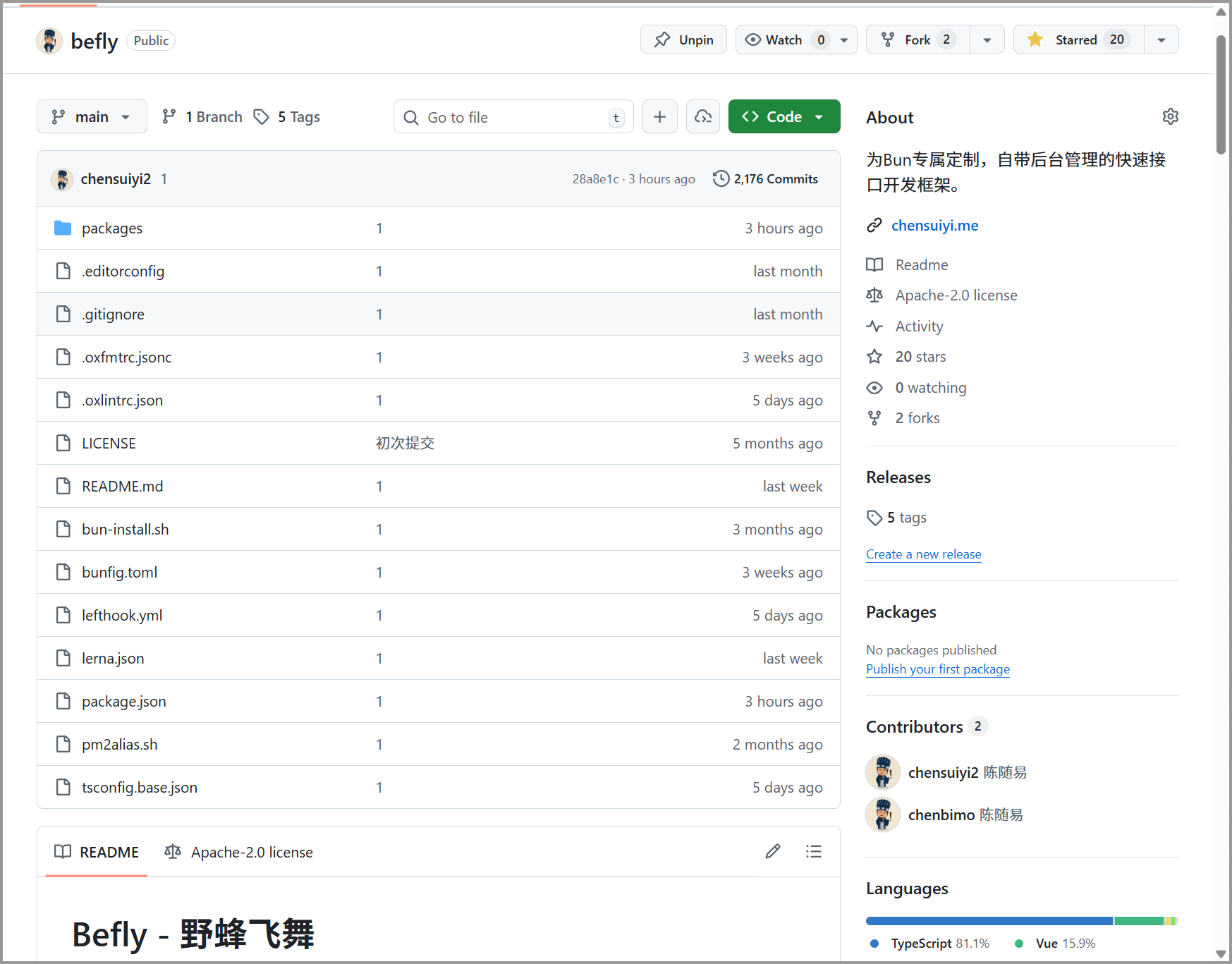
比如我自己开发的为 Bun 专属打造的后端接口框架 野蜂飞舞 https://github.com/chenbimo/befly,就通过 Bun 打包为一个压缩后 200+kb 的 js 文件,只要简单地放在项目中就能提供完整的后端接口功能,无需安装 npm 包那一套。
不仅如此,Bun 还可以打包文件为单个可执行文件,比如exe,还能把整个后端服务和前端页面打包为单个可执行文件,也就是说,点击文件,直接在本地托管一个完整的前后端项目,隔壁 Nodejs 连打包exe还在测试阶段,不知道猴年马月才会完善,而 Bun 已经遥遥领先。
Http 服务功能
写 Web 服务,就算不用什么 express,koa 框架,也能直接获得很好的开发体验,如下示例:
const server = Bun.serve({
    routes: {
        // 静态路由
        "/api/status": new Response("OK"),

        // 动态路由
        "/users/:id": (req) => {
            return new Response(`Hello User ${req.params.id}!`);
        },

        // 同一个请求不同方法返回不同内容
        "/api/posts": {
            GET: () => new Response("List posts"),
            POST: async (req) => {
                const body = await req.json();
                return Response.json({ created: true, ...body });
            }
        },

        // 所有以/api/开头的路由
        "/api/*": Response.json({ message: "Not found" }, { status: 404 }),

        // 重定向
        "/blog/hello": Response.redirect("/blog/hello/world"),

        // 匹配收藏图标
        "/favicon.ico": Bun.file("./favicon.ico")
    },

    // 无匹配保底
    fetch(req) {
        return new Response("Not Found", { status: 404 });
    }
});
如果在 Nodejs 中,得用find-my-way之类的路由包来实现。
不仅于此,Bun 中各种好用的功能太多了,以下是本次Bun v1.3.6更新的功能:
// 解压tar包
const tarball = new Bun.Archive(await Bun.file("package.tar.gz").bytes());
const fileCount = await tarball.extract("./output-dir");

// 压缩tar包
const compressed = new Bun.Archive(files, { compress: "gzip" });
内置了 Bun.Archive接口,可以直接替代 Nodejs 中要用node-tar包才能实现的功能,而且速度快了4-30倍。
const config = Bun.JSONC.parse(`{
  // Database configuration
  "host": "localhost",
  "port": 5432,
  "options": {
    "ssl": true, // trailing comma allowed
  },
}`);

console.log(config.host); // "localhost"内置了Bun.JSONC.parse() ,可以解析带有注释的 json 文件。
const result = await Bun.build({
    entrypoints: ["./src/index.ts"],
    outdir: "./dist",
    metafile: true
});

// 分析打包大小
for (const [path, meta] of Object.entries(result.metafile.inputs)) {
    console.log(`${path}: ${meta.bytes} bytes`);
}

for (const [path, meta] of Object.entries(result.metafile.outputs)) {
    console.log(`${path}: ${meta.bytes} bytes`);
}

// 写入到本地,可以被诸如esbuild这样的打包工具分析
await Bun.write("./dist/meta.json", JSON.stringify(result.metafile));打包功能提供了metafile属性,可以生成打包元数据,然后用其他工具,可以对打包产物进行可视化查看,提供更好的分析优化。
const result = await Bun.build({
    entrypoints: ["/app/index.ts"],
    files: {
        "/app/index.ts": `
      import { greet } from "./greet.ts";
      console.log(greet("World"));
    `,
        "/app/greet.ts": `
      export function greet(name: string) {
        return "Hello, " + name + "!";
      }
    `
    }
});
可以在打包的时候,用虚拟文件替换磁盘文件,灵活方便,但真实场景我自己还没有用到。
另外呢,就是速度提升方面的更新,Bun 在这方面一直不遗余力地优化和压榨代码性能。
Response.json()提速3.5倍,async/await提速15%,promise.race()提速30%,Buffer.indexOf()提速2倍,打包单个可执行文件有内嵌.node文件是更快,JSON IPC传送大数据提高9倍,Bun.spawnSync()提速30倍,更快的 JSON 序列化。
每次更新,对 Nodejs 的兼容性就会进一步提高,一些可能之前无法运行,或者运行有问题的项目,可以试一试,说不定就正常了。
我从 Bun 还没有发正式版开始用,一步步体验到了从完全不可用,到用了一堆报错,到现在稳定运行,成为自己的趁手武器,推荐每个写前端,写 JS/TS 的小伙伴们都上手试试。
更多更新细节,可以前往 Bun 官方了解,以下是我的三个公众号账号,感兴趣的朋友可以多多关注。